How to Redesign a Regretted Tattoo with AI
Regret an old tattoo? See how AI tattoo redesign reimagines outdated ink into fresh concepts for your artist — before you commit to a cover-up.
Why “redesign” beats “cover-up” or “removal” for most tattoo regret
You got the tattoo five years ago. The meaning faded, the line work blurred, or your taste simply moved on. The instinct is often “laser it off” or “cover it up” — but both are bigger commitments than most people expect.
A 2023 survey by Advanced Dermatology found that 1 in 4 Americans regret at least one tattoo, and for more than half of them the regret did not surface until two or more years after the ink went in. Only 18% felt regret within days. Tattoo regret is usually a slow drift, not a sudden mistake — which means the fix should start with re-seeing the design, not immediately destroying it.
Redesign is the middle path. Instead of removing ink or masking it, you reimagine what that patch of skin could become. AI makes this exploration nearly free and instant, so you can test directions before you ever sit in a chair.
If you are trying to redesign old tattoo elements without committing to a larger cover-up, AI tattoo redesign gives you a low-pressure way to compare the original mark, the parts worth preserving, and the new style direction side by side.
| Approach | What it changes | Typical cost | Time to result | Best when |
|---|---|---|---|---|
| AI redesign | Reimagines the design as a new concept | Free–$10 | Minutes | You’re unsure what you want next |
| Traditional cover-up | Masks old ink with a larger, darker piece | $100–$300 consult; more for sleeves | 1+ sessions | The old tattoo is dark or meaningful to hide |
| Laser removal | Breaks down ink so skin clears | Hundreds per session; 6–10 treatments per FDA | Months–years | You want the area blank again |
How AI tattoo redesign actually works
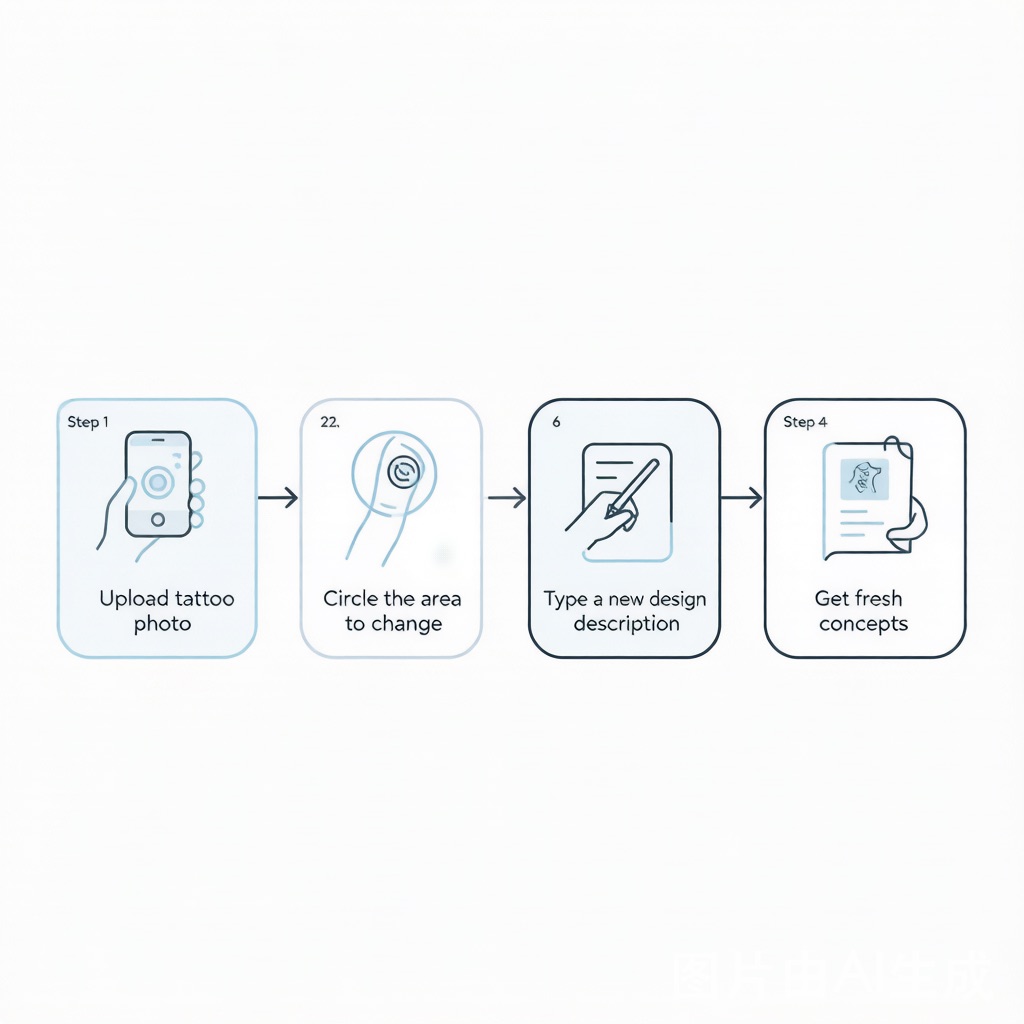
Modern AI tattoo editors let you work with your existing tattoo instead of starting from a blank prompt. The workflow used by tools like Inker’s Tattoo Remix and TatBox breaks into five moves:
- Upload a clear photo. Natural light, plain background, the whole tattoo in frame. Blurry or shadowed shots confuse the model.
- Mark what you dislike. Circle the dated script, the faded blob, or the ex-partner’s initials. Good editors redesign only the masked region and leave the rest intact.
- Describe the new direction. “Botanical line art,” “neotraditional fox,” or “blackwork compass” — the more specific, the closer the first pass.
- Iterate style and placement. Generate 20–50 variations in the time it takes to brew coffee. A 2026 tool comparison noted you can test dozens of style variations in an hour for free, versus $150–$300 for a single hand-drawn concept from an artist.
- Export for your artist. Download a clean, watermark-free file and bring it to a consultation as a visual brief.
The goal is not a print-ready tattoo. The goal is a conversation starter with someone who understands skin. If you’re new to prompting, our AI tattoo generator guide covers the basics.
AI redesign vs. the traditional routes
Cost and speed are where AI clearly wins the exploration phase, but the routes are not enemies — they stack.
| Factor | AI redesign | Laser removal | Traditional cover-up |
|---|---|---|---|
| Upfront cost | Free–$10 | $100s per session | $100–$300 consult |
| Full project cost | Just the tool | Often $1,000+ | $300–$1,000+ for large pieces |
| Reversible? | Yes — it’s a file | No — alters skin | No — adds ink |
| Best for | Finding direction | Clearing the canvas | Hiding dark old ink |
The U.S. FDA notes that laser tattoo removal may take 6 to 10 treatments and “cost a lot of money,” and that no tattoo ink pigments are approved for injection into the skin. Mayo Clinic adds that most removal methods are likely to leave some scarring. That context is exactly why starting with a low-risk redesign makes sense.
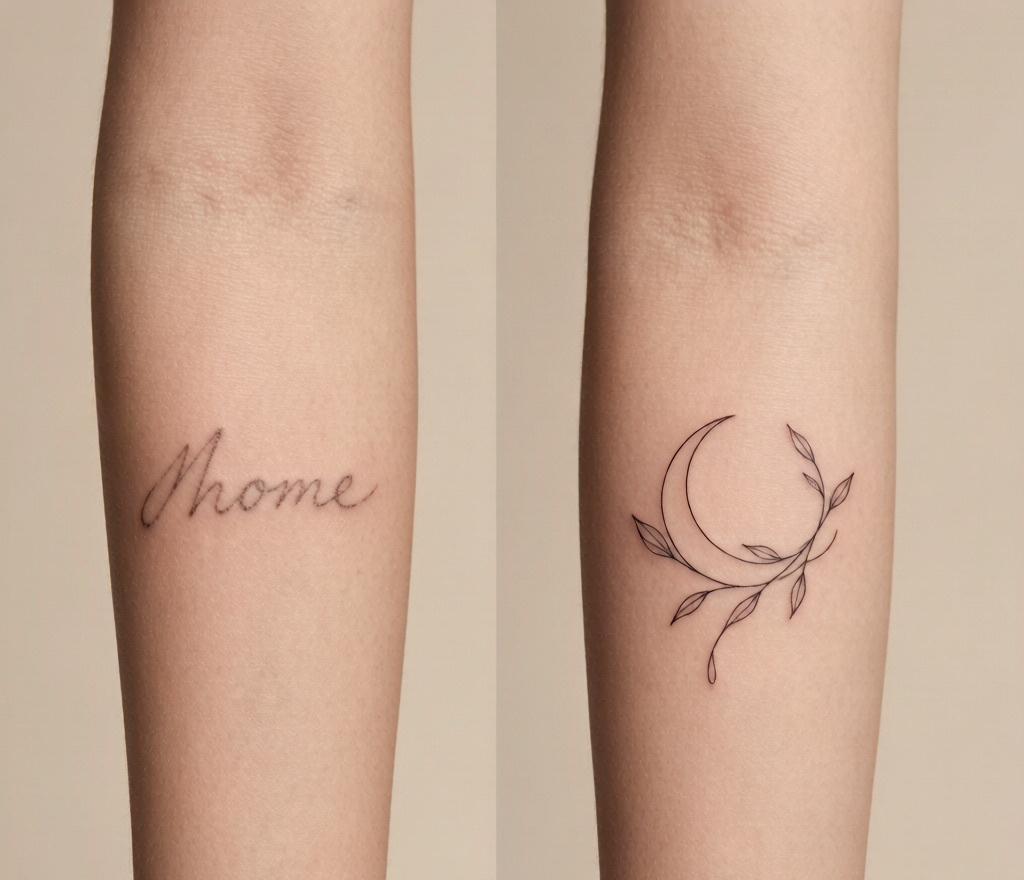
In the walkthrough above, an artist turns a regretted name tattoo into a new piece — the same “reimagine, then commit” logic AI helps you rehearse first.
A real redesign example: name into botanical
One of the most common regrets is a name tattoo. The old script sits on a forearm; the relationship is over. A cover-up artist would normally propose a larger, darker design to swallow the lettering. With AI redesign, you can preview several directions first:
- A fine-line crescent moon wrapped in vines (keeps the area light)
- A neotraditional rose cluster (more coverage, more color)
- A blackwork moth (highest concealment for dark old ink)
Each takes seconds to generate. You pick the one that feels like you now, then hand it to an artist who handles the actual concealment. Our cover-up generator is built for that next step — turning the concept into a piece engineered to hide the underlying ink. Not sure which style fits? The tattoo style guide compares traditional, minimalist, watercolor, and more.
What AI can’t do (be honest with yourself)
AI is a sketchbook, not a skin expert. It does not model:
- How ink ages on your specific skin type
- Body movement and contour — a flat design stretches and warps on a joint
- Healing history, scar tissue, or pain tolerance
- Cultural context of symbols you might casually borrow
A 2026 comparison of AI tattoo generators put it plainly: AI excels at rapid exploration, but the final design should be redrawn by a human artist who accounts for these limits. Use AI to decide what, then let a professional decide how it lives on skin. Placement matters too — a redesign that looks great as a square image may need resizing for a wrist or ribs, which our placement guide breaks down by pain and aging.
Frequently asked questions
Can AI really redesign my existing tattoo? Yes. Current tools let you upload a photo of the tattoo, mark the parts you dislike, describe the new direction, and generate fresh concepts in seconds. It works best as exploration before you book an artist — not as a finished tattoo.
Is an AI redesign the same thing as a cover-up plan? No. A redesign reimagines the artwork; a cover-up must also conceal the old ink’s darkness and shape. Use AI redesign to find a direction you love, then move to a cover-up specialist (or a cover-up generator) for the concealment layer.
How much does it cost to redesign a tattoo with AI versus hiring an artist? AI exploration is usually free or a few dollars. A custom artist concept typically runs $150–$300, a standard cover-up consult $100–$300, and a full sleeve design consult $500–$1,000. AI saves you from paying for directions you end up disliking.
Will the AI design look the same once it’s on my skin? Not exactly. AI doesn’t simulate skin texture, body movement, or how ink fades over years. Treat the output as a reference and have a professional adapt it to your anatomy — the FDA’s cautions on tattoo safety apply to the final ink, not the preview.
Do I still need a tattoo artist after using AI? Yes. The AI file is a brief, not a blueprint. A human artist translates it to real skin, adjusts for your body, and makes sure it ages well. The workflow is AI for ideas, artist for execution.
Start by re-seeing, not removing
Tattoo regret is normal — roughly a quarter of inked Americans live with at least one piece they would rethink. You don’t have to jump to lasers or a costly cover-up on day one. Sketch the possibilities with AI, compare directions side by side, and walk into a studio with a concept you actually want. When you’re ready to hide old ink for good, our cover-up generator turns that concept into a piece built to conceal.
Treat the first export as a redo tattoo design brief: useful enough to guide a consultation, but still flexible enough for a professional to redraw before it reaches skin.